

Best Office Chairs for Bad Backs 2025

What Causes Chronic Back Pain?
Chronic back pain often results from poor posture, insufficient lumbar support, and inadequately designed chairs. Nearly 80% of adults will encounter lower back pain during their lives, with improper seating arrangements being a significant contributing factor. Prolonged sitting can lead to slouching and excessive strain on the spine if the chair does not support the natural curve of your back, resulting in disc compression and muscle fatigue.
How Do Ergonomic Chairs Help with Back Pain?
Ergonomic chairs are engineered to promote better posture and reduce discomfort associated with long periods of sitting. These chairs help distribute body weight evenly across pressure points, minimizing stress on areas like the hips and tailbone while improving circulation. Proper spinal alignment is maintained through adjustable features that keep your spine in a neutral position—reducing tension headaches, shoulder strain, and stiffness.
Reclining mechanisms allow users to shift positions throughout the day, relieving spinal pressure and encouraging flexibility in the lower back—especially beneficial for those with sciatica or herniated discs. Multiple adjustment options such as seat height, lumbar support levels, and armrest positioning enable users to customize their seating experience according to individual needs.
Key Features to Look For:
- Ergonomic Support: Adjustable lumbar support for proper spinal alignment.
- Adjustability: Customizable recline angles, seat height settings, armrests.
- Material & Cushioning: High-density memory foam; breathable fabrics.
- Customization: Adaptable design suitable for various body shapes.
- Workplace Integration: Versatile enough for both home offices and corporate environments.
Top Office Chairs for Back Pain Relief:
For Chronic Pain:
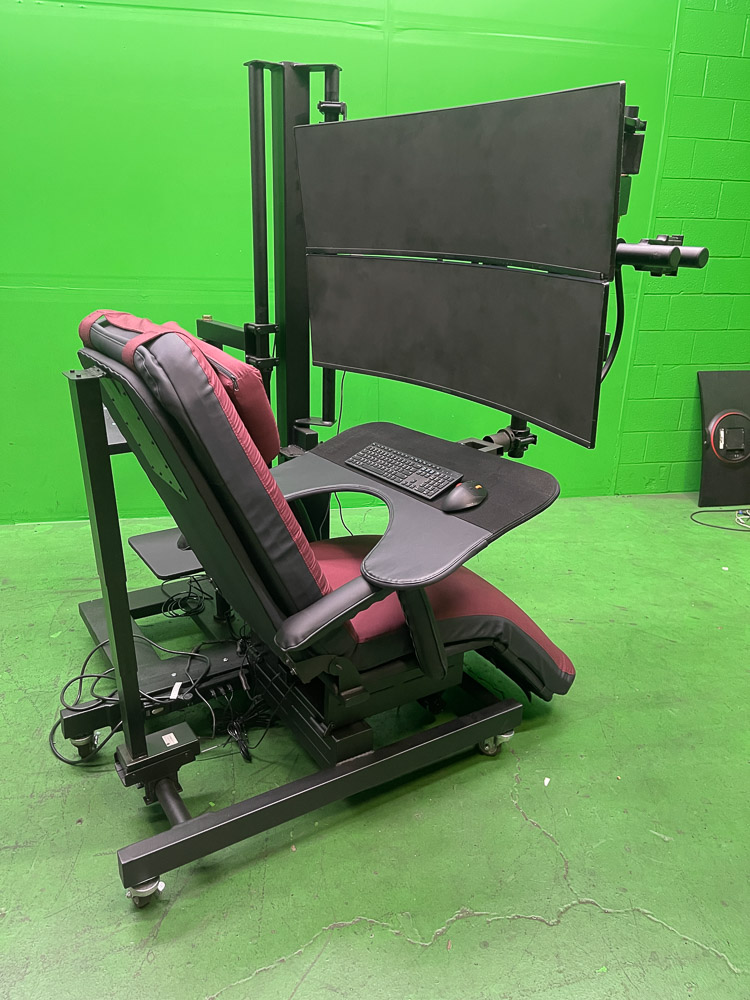
- ErgoQuest Zero Gravity Workstations – Highly customizable solutions designed specifically for chronic pain relief; these workstations provide full-body ergonomic support that promotes healthy posture throughout long work sessions.
- Herman Miller Embody – Features a unique spinal design allowing personalized fit; pixelated support adapts dynamically as you move.
For Hybrid Workspaces:
- Steelcase Leap – Incorporates LiveBack technology that mimics natural spine movement; offers manual adjustments including lumbar firmness control.
- Secretlab Titan Evo – A gaming/office hybrid equipped with an advanced Lumbar Support System plus a magnetic pillow that stays secure during movement.
For Budget Buyers:
- La-Z-Boy Delano – Offers memory foam cushioning with adjustable headrest/tilt/lift functions plus dedicated lumbar panel.
- Humanscale Freedom Chair – Headrest automatically adjusts as you recline; arm supports move synchronously with your movements; multi-layered airpads enhance comfort.
For Maximum Recline & Comfort:
- ErgoQuest Zero Gravity Chairs – Provide comprehensive ergonomic reclining features aimed at reducing spinal stress while eliminating pressure points across your entire body—ideal for individuals seeking maximum comfort or dealing with medical conditions affecting their backs.
Selecting an office chair tailored specifically toward alleviating back pain can significantly improve daily comfort levels while supporting long-term health outcomes. Consider these options based on your specific needs—whether it’s chronic discomfort management or simply enhancing workplace ergonomics—to ensure both productivity and well-being are prioritized throughout your workday.
Key Models & Features:
- Zero Gravity Chair 1 features a motorized recline and legrest, memory foam padding with a microfiber cover, and maintains a 120-degree fixed angle at the thigh and abdomen for ergonomic comfort. Users can further customize this chair with optional side tables and monitor or laptop arms, making it ideal for creating an efficient workstation. The available subtypes include: 1a (with monitor arm), 1b (with laptop tray and arm), and 1c (with both monitor arm and laptop tray).
- Zero Gravity Chair 2 offers the familiar feel of a traditional office chair combined with zero gravity recline functionality. This allows users to work comfortably in both upright and reclined positions. It also includes a swivel function for full 360-degree rotation, along with an ergonomic design featuring a fixed 100-degree angle at the thigh and abdomen. Subtypes are: 2a (with laptop arm) and 2b (with both laptop arm and monitor arm).
- Zero Gravity Chair 3 is designed to provide comprehensive full-body support through three motors that independently adjust the back, seat, and legrest angles. This model enables users to achieve anything from an upright position to fully flat supine posture, offering infinite adjustability between these extremes. Subtypes include: 3a and 3b, each allowing customization of armrests as well as workstation attachments.
- Zero Gravity Chair 4 stands out as the most advanced option in this lineup. It features an articulating back, seat, and legrest for exceptional ergonomic flexibility—including achieving a precise 90-degree angle at the thigh-abdomen junction—making it especially suitable for those requiring specialized positioning due to medical or comfort needs. Its subtypes are: 4a (motorized headrest), 4b (motorized headrest plus retracting legrest), and 4c (motorized headrest plus motorized footrest).
Pairing your ErgoQuest chair with an ErgoQuest Zero Gravity Workstation can significantly enhance your work environment. A frequently recommended combination is the ErgoQuest Zero Gravity Chair 4 alongside the ErgoQuest Zero Gravity Workstation 2c.
Comparing Zero Gravity Chairs and
Traditional Office Chairs
Posture and Support: Zero gravity chairs are designed to position your body in a weightless posture, which helps reduce spinal compression and improve circulation. While traditional office chairs provide ergonomic support, they do not offer the same level of full-body relaxation as zero gravity models.
Pressure Relief: Traditional office chairs often create uneven pressure on the lower back. In contrast, zero gravity chairs distribute weight evenly across the body, helping to alleviate pain. These chairs replicate the posture astronauts use during takeoff—a position scientifically proven to reduce spinal stress.
Work Efficiency: With superior lumbar support and multiple recline options, zero gravity chairs can boost focus and productivity compared to conventional seating. The ability to work comfortably for longer periods leads to better concentration and efficiency.
Health Benefits: Zero gravity seating offers several health advantages, including reduced muscle tension, improved circulation, prevention of long-term spinal issues, enhanced lung expansion, reduced risk of varicose veins, and improved digestion due to less abdominal compression.
Keyboard and Mouse Stability When Reclined: The workstation tray features a felt covering that functions like a hook-and-loop system. This ensures that your keyboard and mouse pad remain securely in place at any recline angle—eliminating concerns about shifting equipment while you work.
Customization Options: ErgoQuest provides extensive customization choices for their chairs. You can select from various cushion foam types such as memory foam, latex, or polyurethane according to your comfort preferences. Additionally, there are over 100 cotton cushion cover colors and more than 25 genuine leather options available for personalized aesthetics. ErgoQuest’s in-house sewing, powder coating, and welding services enable rapid production tailored precisely to individual body dimensions.
Showroom Testing: If you wish to try an ErgoQuest chair before purchasing it, you can visit their showroom at 955 Godfrey Avenue in Grand Rapids, Michigan. Contact them directly to schedule an appointment.
Professional Installation Service: ErgoQuest offers an Installation and Setup Service for $450—a professional assembler will deliver the chair directly to you and handle all unpacking and setup tasks onsite. However, many customers find assembly straightforward with provided instructions if they prefer self-assembly.
Final Verdict – Why Choose ErgoQuest?
ErgoQuest stands out due to its advanced customization options that ensure optimal support for every user; its zero gravity positioning eliminates lower back pressure; it is designed specifically for long-term pain relief as well as increased work efficiency. For those seeking effective back pain relief in an office setting—especially heading into 2025—ErgoQuest’s Zero Gravity Chairs provide exceptional comfort along with adjustable ergonomic benefits tailored for modern workplaces.