

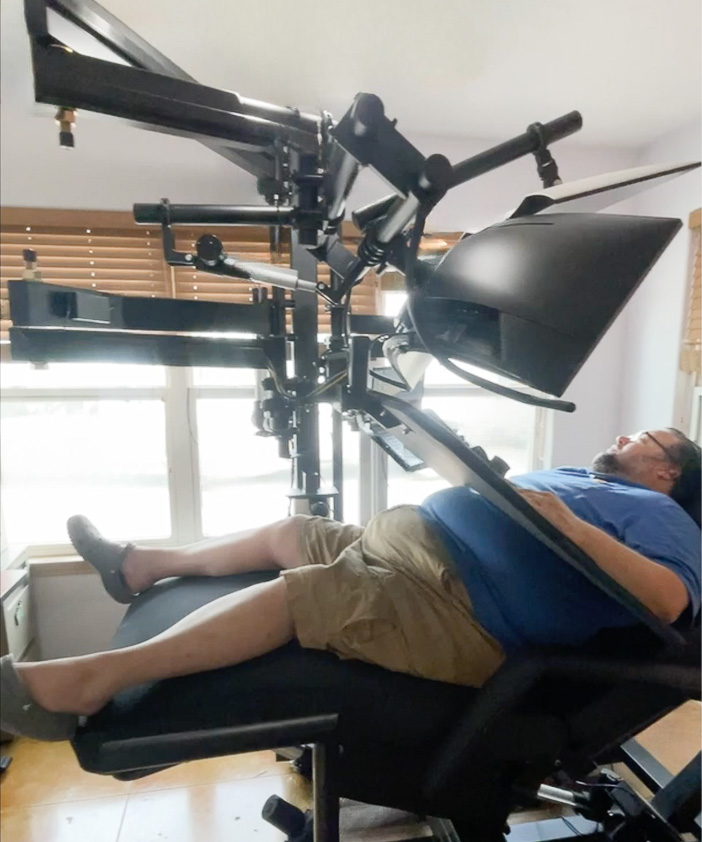
How Roger Beat Back Pain with a Zero Gravity Workstation 0b-XL-Lift

I’ve been doing engineering CAD work for close to 30 years now and I’ve been struggling with back pain for a little over 25 of that. The simple fact is that my back pain has limited my time to work more than anything else has. I have discovered that in an inclined position I am able to work much longer and be very much more productive.
The challenge I have is that my back went out in November worse than it’s ever done before and I’ve actually been laying in bed for just about a month, and it was the first time in my life where I didn’t think that I could support my family. I didn’t know if I would be able to work.
So I discovered the workstation option, and in a moment of desperation, I went ahead and bought a used Altwork station that I was able to find on Amazon marketplace, and at the same time I worked with my company to find a more permanent solution with ErgoQuest.
About the Altwork Signature Station
I’m not a small guy, and the Altwork is only designed for people up to 300 pounds. I’ve had to make quite a few mods just to be able to use the desk in the temporary form that I have it.
I wanted it facing so you can see the driveway, but it only comes in the left hand configuration. The chair is really small for my hips.
One of the limitations that I’ve had is getting the monitor where I want it. For my size, I’d like it to be about a foot higher. One of the things I’m looking forward to with the ErgoQuest [workstation] is the ability to adjust the monitors to my line of sight so I can see quite a bit better.
The footrest is so small that I have to cross my legs. I could never quite get the head[rest] where I wanted it, so I bought this pillow. The only thing that really worked — because I can’t get the monitor higher — is to put the pillow to get my head tilted so I could go to the monitor instead of the monitor coming to my head.
Because I use a space mouse for my CAD work, I’m not able to fit everything on the tray. The keyboard and mouse; I had to 3D print something to put it up [above the monitor]. It’s supposed to be on the tray so the microphone is closer to me. There’s no place on the tray. I thought the magnetic surface would be handy, but it’s not — it’s kind of a pain. For my keyboard I just ended up putting some heavy magnets [underneath] to hold it in place.
If you’re a wider guy, the chair has no chance of supporting your arms at all, even with a wider back. When I first got it, it was almost impossible to work. Your arms just got really fatigued trying to hold them up all day. I was fortunate enough that I have a 3D printer, and I was able to get these adapter arms, but even that, though it’s worked for a few months, pretty much every day I’ve been waiting for the ErgoQuest [workstation] to come.
For the first time in nearly 20 years, in this position I’m able to work for a couple of hours without pain, and that’s never been true before. And it is fairly elegant-looking; they did make it a nice, compact unit, but at the same time if it’s compact then it doesn’t really fit your needs, then it’s not that great.
About the ErgoQuest ZGW-0b-XL-Lift
[My] first impression, sitting in it for the first time, is how way more comfortable it is, mainly because my feet are able to fit in a natural wide position, and the fact that my elbows have a very natural resting point, where I did not have any resting point on the Altwork workstation till I tried to rig something.
I’m also noticing that it is very nice to get the monitor in the actual position I need it to be in — to tilt it back and get it higher, so that my chin does not have to be buried into my chest; my head can be in a very comfortable position backwards.
Having the big wide surface [on the tray] is an incredible bonus, because you can lay your devices out — especially if you have multiple devices. And if you have a wide keyboard like I do because I have a wide chest. The surface is way more comfortable than the metal surface that was on the Altwork workstation with a little extra padding for the elbows. And just being able to find a sweet spot for the monitor to move it around. The tilt on the monitor is really handy to be able to find that nice sweet spot.
I’m 6 feet 2 inches to three inches in height, and I’m pushing 450 pounds. I’ve always had a really wide barreled chest. This is the first piece of furniture that I’ve sat in that actually fits me, that is big enough, comfortable enough. And I can’t say enough about how the armrests are tall enough to actually be supportive. With the customization that ErgoQuest is able to do, during their meeting where they show you the build process, make adjustments to things like armrest height and make it a little higher, and that is not something you’re gonna get with one of the other manufacturers that is for sure.
About 20 years ago when I was starting to have back pain I was thinking that something like this should exist, and I had no idea that it did exist until I started researching a few months ago when my back [pain] made it so I could not sit at all. In this position, I’m able to do CAD work for hours at a time in comfort. The only downside to this setup, is that I’m probably going to have to set a timer to remind myself to get up and walk around on occasion, because otherwise I’d probably work too long!